The Logo of XcelsusThe Logo of Xcelsus
Open Application Framework
  • Home
  • DOCUMENTATION
    • Application Framework
    • Project Efforts
    • QBar
  • FAQ
  • Home
  • DOCUMENTATION
    • Application Framework
    • Project Efforts
    • QBar
  • FAQ

QBar

Home/Documentation/QBar
Expand All Collapse All
  • QBar
    • Orders
    • Order History
    • Create Order
    • Calendar
    • Reservations
    • Service Calls
    • Reporting
      • Revenue
      • Daily seatgroup revenue
    • Configuration
      • Service Areas & Seatgroups
      • Menu
      • Menu Options
      • Service Groups
      • Allergens
      • Menu AI
  • App Settings
    • QBar Settings

Reservations

37 views 0 23. June 2024

Managing Reservations

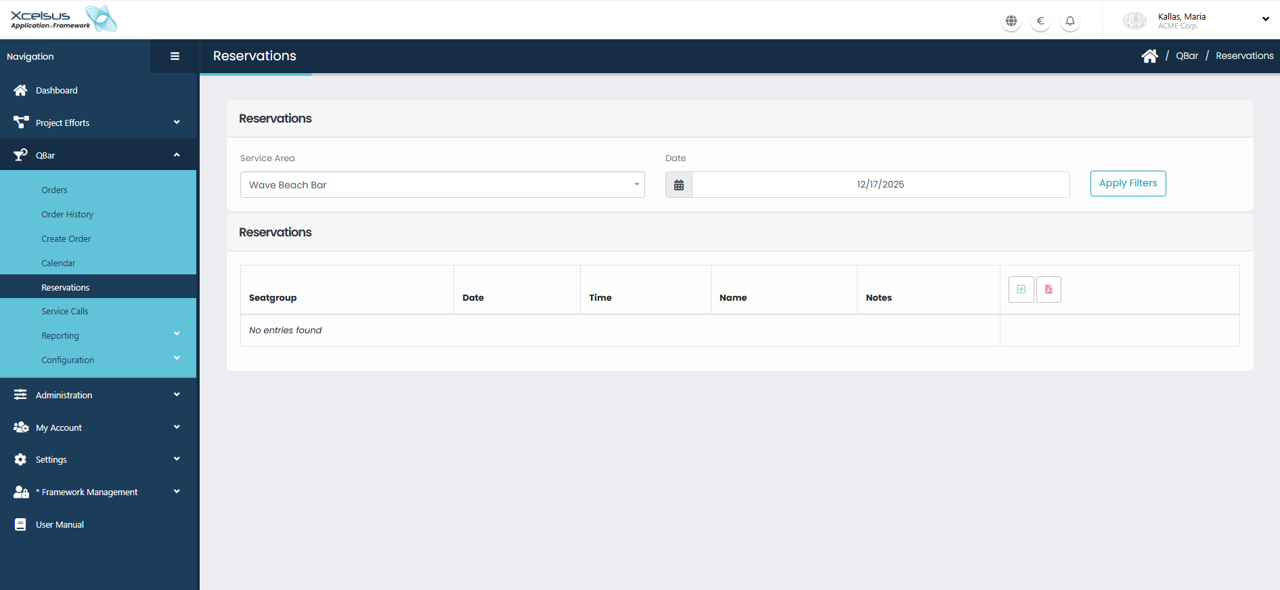
The Reservations screen is used to view and manage seat or table reservations for a selected service area and date. At the top of the page, you can filter reservations by choosing a Service Area and selecting a specific Date. Once the filters are set, clicking Apply Filters refreshes the list to display only the relevant reservations.

All reservations are displayed in a table showing key information such as Seatgroup, Date, Time, Name, and any associated Notes. This overview makes it easy to track upcoming reservations and identify availability. If no reservations exist for the selected criteria, the system will display a message indicating that no entries were found.

From this screen, users can also create new reservations or manage existing ones using the action icons provided in the table header. This ensures reservations can be efficiently organized and updated as needed, helping staff maintain accurate scheduling and service planning.

Was this helpful?

Yes  No

Didn't find your answer? Contact Us

Previously
Calendar
Up Next
Service Calls
Developed by
  • Xcelsus GmbH
  • Xcelsus Hellas M.I.K.E.
SUPPORT
  • Knowledge Base
  • Video Manuals
SOCIAL
  • Facebook
  • Instagram
  • LinkedIn
  • Privacy Policy
  • Terms and Conditions
  • Cookie Policy (EU)
  • © 2026 xcelsus group. All Rights Reserved.

Manage Consent
To provide the best experiences, we use technologies like cookies to store and/or access device information. Consenting to these technologies will allow us to process data such as browsing behavior or unique IDs on this site. Not consenting or withdrawing consent, may adversely affect certain features and functions.
Functional Always active
The technical storage or access is strictly necessary for the legitimate purpose of enabling the use of a specific service explicitly requested by the subscriber or user, or for the sole purpose of carrying out the transmission of a communication over an electronic communications network.
Preferences
The technical storage or access is necessary for the legitimate purpose of storing preferences that are not requested by the subscriber or user.
Statistics
The technical storage or access that is used exclusively for statistical purposes. The technical storage or access that is used exclusively for anonymous statistical purposes. Without a subpoena, voluntary compliance on the part of your Internet Service Provider, or additional records from a third party, information stored or retrieved for this purpose alone cannot usually be used to identify you.
Marketing
The technical storage or access is required to create user profiles to send advertising, or to track the user on a website or across several websites for similar marketing purposes.
  • Manage options
  • Manage services
  • Manage {vendor_count} vendors
  • Read more about these purposes
View preferences
  • {title}
  • {title}
  • {title}