Daily Seatgroup Revenue
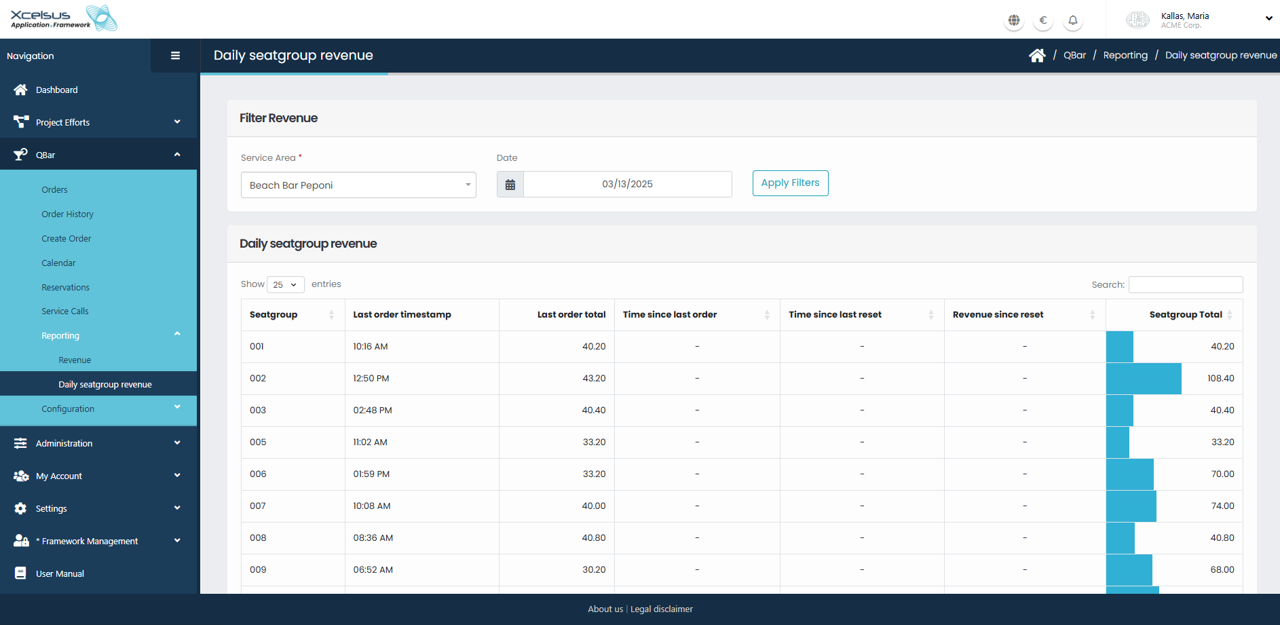
The Daily seatgroup revenue screen provides a more detailed, operational view of revenue performance by seatgroup for a single service area on a specific date. This report is useful for monitoring real-time or daily sales activity at a granular level.
In the Filter Revenue section at the top of the page, you must select a service area and a date. Once both values are set, click Apply Filters to load the seatgroup revenue data for that day.
The Daily seatgroup revenue table lists each seatgroup separately, along with detailed timing and revenue information. For every seatgroup, the table shows the timestamp of the last order placed, the value of that order, and the total revenue accumulated by the seatgroup. Additional columns indicate the time since the last order and the time since the last reset, allowing staff to quickly identify inactive or underperforming seatgroups.
A visual bar indicator next to the seatgroup total helps compare revenue performance at a glance. You can use the search field or adjust the number of visible entries to quickly locate specific seatgroups in larger lists.
This view is intended to support daily operational decisions by providing clear insight into how revenue is distributed across seatgroups throughout the selected day.