The Logo of XcelsusThe Logo of Xcelsus
Open Application Framework
  • Home
  • DOCUMENTATION
    • Application Framework
    • Project Efforts
    • QBar
  • FAQ
  • Home
  • DOCUMENTATION
    • Application Framework
    • Project Efforts
    • QBar
  • FAQ

QBar

Home/Documentation/QBar
Expand All Collapse All
  • QBar
    • Orders
    • Order History
    • Create Order
    • Calendar
    • Reservations
    • Service Calls
    • Reporting
      • Revenue
      • Daily seatgroup revenue
    • Configuration
      • Service Areas & Seatgroups
      • Menu
      • Menu Options
      • Service Groups
      • Allergens
      • Menu AI
  • App Settings
    • QBar Settings

Create Order

43 views 0 23. June 2024

Creating an Order

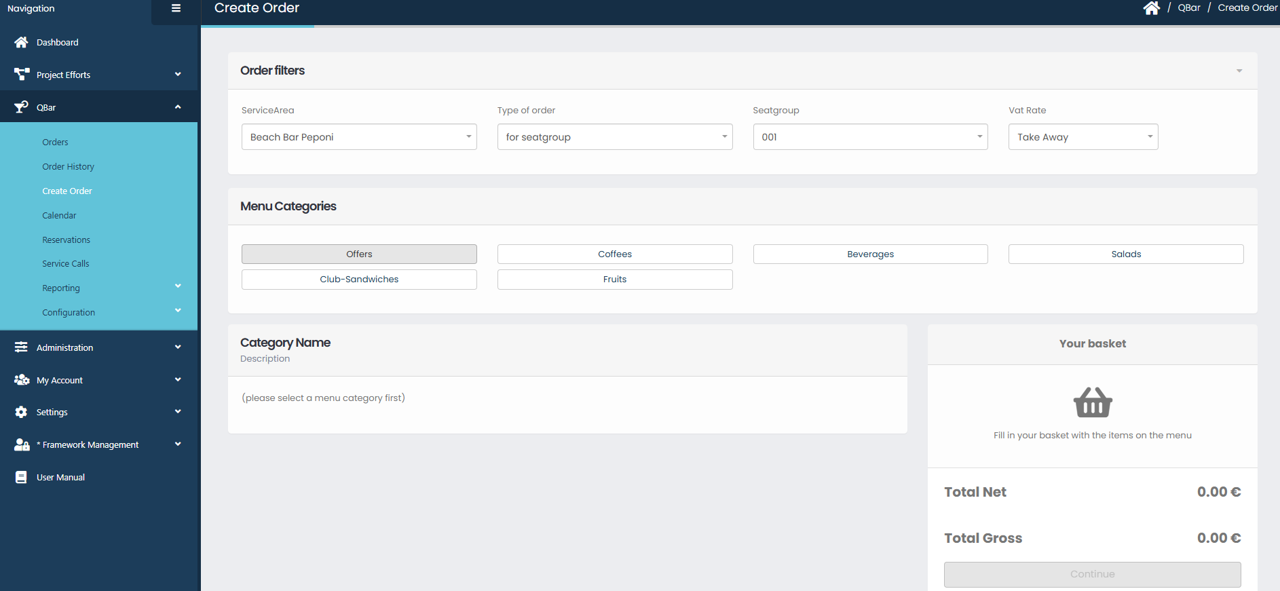
The Create Order screen allows users to place new orders quickly and efficiently within a selected service area. At the top of the page, order filters are used to define the context of the order. You can select the Service Area, specify the Type of Order, choose the appropriate Seatgroup, and apply the correct VAT Rate. These filters ensure that the order is created under the correct operational and pricing conditions.

Below the filters, the Menu Categories section displays all available product categories, such as offers, beverages, coffees, or snacks. Selecting a category will load the corresponding items in the main content area. Once a category is selected, the available products appear, allowing you to add items to the order.

As items are selected, they are added to Your Basket, which is displayed on the right side of the screen. The basket shows all chosen items along with the calculated Total Net and Total Gross amounts. You can review the order contents at any time before proceeding. When the order is complete and all details are correct, clicking Continue will move the order forward in the process. If no items are added, the basket remains empty and the order cannot be finalized.

Was this helpful?

Yes  No

Didn't find your answer? Contact Us

Previously
Order History
Up Next
Calendar
Developed by
  • Xcelsus GmbH
  • Xcelsus Hellas M.I.K.E.
SUPPORT
  • Knowledge Base
  • Video Manuals
SOCIAL
  • Facebook
  • Instagram
  • LinkedIn
  • Privacy Policy
  • Terms and Conditions
  • Cookie Policy (EU)
  • © 2026 xcelsus group. All Rights Reserved.

Manage Consent
To provide the best experiences, we use technologies like cookies to store and/or access device information. Consenting to these technologies will allow us to process data such as browsing behavior or unique IDs on this site. Not consenting or withdrawing consent, may adversely affect certain features and functions.
Functional Always active
The technical storage or access is strictly necessary for the legitimate purpose of enabling the use of a specific service explicitly requested by the subscriber or user, or for the sole purpose of carrying out the transmission of a communication over an electronic communications network.
Preferences
The technical storage or access is necessary for the legitimate purpose of storing preferences that are not requested by the subscriber or user.
Statistics
The technical storage or access that is used exclusively for statistical purposes. The technical storage or access that is used exclusively for anonymous statistical purposes. Without a subpoena, voluntary compliance on the part of your Internet Service Provider, or additional records from a third party, information stored or retrieved for this purpose alone cannot usually be used to identify you.
Marketing
The technical storage or access is required to create user profiles to send advertising, or to track the user on a website or across several websites for similar marketing purposes.
  • Manage options
  • Manage services
  • Manage {vendor_count} vendors
  • Read more about these purposes
View preferences
  • {title}
  • {title}
  • {title}