Service Areas & Seatgroups
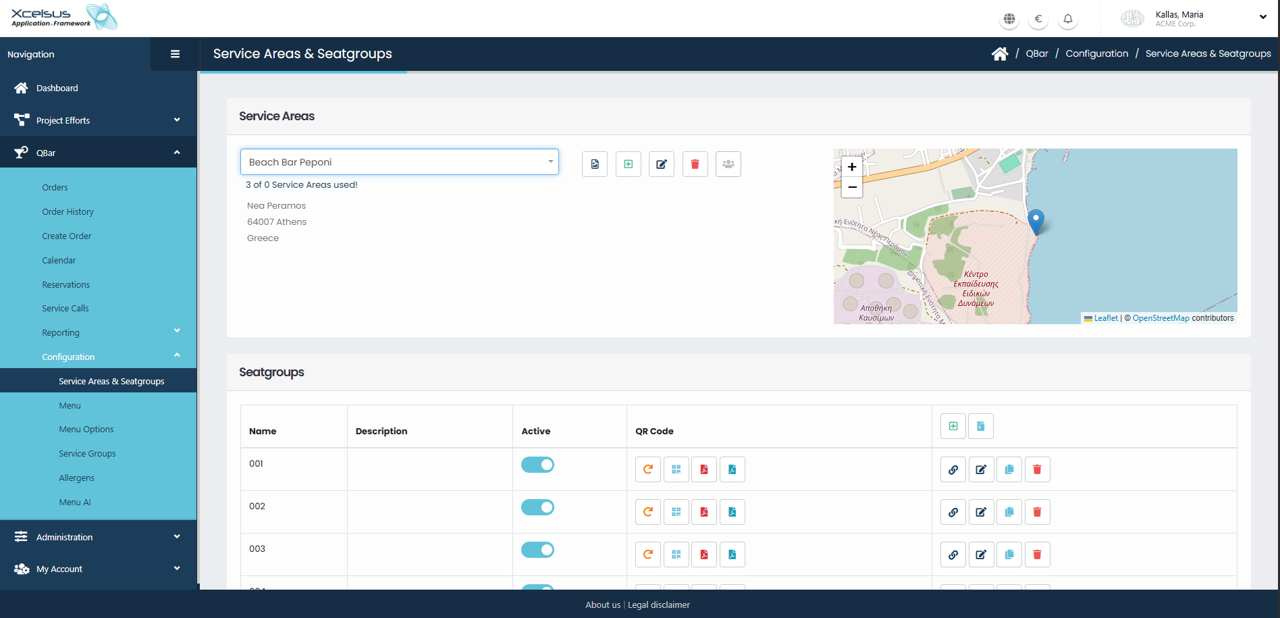
The Service Areas & Seatgroups section allows you to manage physical locations where services are provided and organize seating within those areas. To begin, select a service area from the Service Areas dropdown at the top of the page. Once selected, the system displays key information about the service area, including its name, address, and location on the interactive map. The map provides a visual reference to help confirm that the correct service area is selected.
Next to the service area selector, action icons allow you to create a new service area, edit the selected one, or delete it if it is no longer needed. Any changes made here directly affect how orders and seating are organized within the system.
Below the service area details, the Seatgroups table displays all seatgroups associated with the selected service area. Each seatgroup represents a defined seating unit, such as a table, zone, or section. The table shows the seatgroup name, description, and current active status. You can enable or disable a seatgroup using the active toggle, allowing you to temporarily remove it from use without deleting it.
Each seatgroup also provides quick access to QR code actions, which can be used for customer ordering or identification, depending on system configuration. Additional action icons allow you to edit seatgroup details or permanently remove a seatgroup. All changes are applied immediately after saving, ensuring that seating availability remains up to date.