The Logo of XcelsusThe Logo of Xcelsus
Open Application Framework
  • Home
  • DOCUMENTATION
    • Application Framework
    • Project Efforts
    • QBar
  • FAQ
  • Home
  • DOCUMENTATION
    • Application Framework
    • Project Efforts
    • QBar
  • FAQ

Application Framework

Home/Documentation/Application Framework
Expand All Collapse All
  • Registration process
  • Dashboard and toolbar explanation
  • Application Framework
    • Administration
      • Contacts
      • Companies
      • Customers
      • Employees
      • Users
      • Authorization
        • User Groups
        • User Permissions
        • Permissions Overview
      • Vat Rates
      • User Invitations
      • Translation
    • My Account
      • Transactions
      • Licensee
      • Add Funds
      • Manage Subscriptions
      • Notifications
      • My profile
      • Create new Consumer
      • Invoices
    • Settings
      • General Settings
      • User Settings
      • Project Efforts Settings

Registration process

180 views 0 4. September 2024

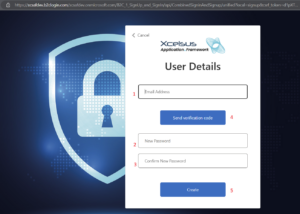
To access the functionalities offered by our applications, every new user needs to sign up for Application Framework and create a new account. Users that are already registered can log in and accept new invitations from Consumers.

The first step requires to provide a valid e-mail address (1, that will be verified and used for identification and communication purposes, and to create and confirm a password for the user account (2, 3). In order to verify the e-mail address, click the button (4) and write in the code received in the e-mail once prompted to.

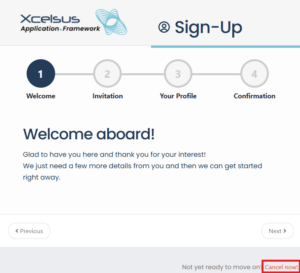
During the sign up process, you can always go back by clicking “Previous” or cancel the registration by clicking “Cancel now”.

Keep in mind that cancelling the registration once you have verified your e-mail address and provided a password, will require you to log in with those credentials in order to sign up, unless you want to use a completely new e-mail address.

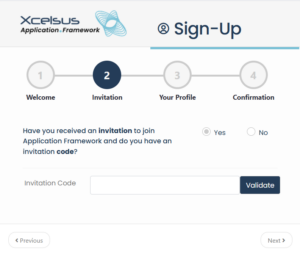
If you received an invitation in your e-mail inbox before your registration, you can click “Yes”, insert the invitation token in text box and click “Validate”.

This will link your user account to the Consumer that invited you, but you will be able to accept other invitations as well once registered.

You can also proceed without an invitation by choosing “No”. It will still be possible to enter your invitation token at a later stage or to create your own Consumer and invite others to join you.

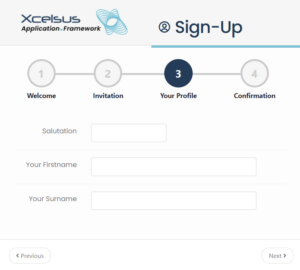
At this point in the registration process, you are required to provide your name, surname and a salutation. Please note that these will be visible to the Consumer(s) you belong to and will be used in all communications addressed to you.

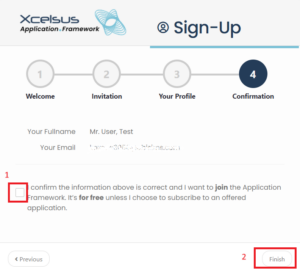
Once you confirm your subscription by checking the confirmation box (1) and click the “Finish” button (2), you will be redirected to Application Framework where you can start exploring our applications.

Was this helpful?

Yes  No

Didn't find your answer? Contact Us

Up Next
Dashboard and toolbar explanation
Developed by
  • Xcelsus GmbH
  • Xcelsus Hellas M.I.K.E.
SUPPORT
  • Knowledge Base
  • Video Manuals
SOCIAL
  • Facebook
  • Instagram
  • LinkedIn
  • Privacy Policy
  • Terms and Conditions
  • Cookie Policy (EU)
  • © 2026 xcelsus group. All Rights Reserved.

Manage Consent
To provide the best experiences, we use technologies like cookies to store and/or access device information. Consenting to these technologies will allow us to process data such as browsing behavior or unique IDs on this site. Not consenting or withdrawing consent, may adversely affect certain features and functions.
Functional Always active
The technical storage or access is strictly necessary for the legitimate purpose of enabling the use of a specific service explicitly requested by the subscriber or user, or for the sole purpose of carrying out the transmission of a communication over an electronic communications network.
Preferences
The technical storage or access is necessary for the legitimate purpose of storing preferences that are not requested by the subscriber or user.
Statistics
The technical storage or access that is used exclusively for statistical purposes. The technical storage or access that is used exclusively for anonymous statistical purposes. Without a subpoena, voluntary compliance on the part of your Internet Service Provider, or additional records from a third party, information stored or retrieved for this purpose alone cannot usually be used to identify you.
Marketing
The technical storage or access is required to create user profiles to send advertising, or to track the user on a website or across several websites for similar marketing purposes.
  • Manage options
  • Manage services
  • Manage {vendor_count} vendors
  • Read more about these purposes
View preferences
  • {title}
  • {title}
  • {title}