The Logo of XcelsusThe Logo of Xcelsus
Open Application Framework
  • Home
  • DOCUMENTATION
    • Application Framework
    • Project Efforts
    • QBar
  • FAQ
  • Home
  • DOCUMENTATION
    • Application Framework
    • Project Efforts
    • QBar
  • FAQ

Application Framework

Home/Documentation/Application Framework
Expand All Collapse All
  • Registration process
  • Dashboard and toolbar explanation
  • Application Framework
    • Administration
      • Contacts
      • Companies
      • Customers
      • Employees
      • Users
      • Authorization
        • User Groups
        • User Permissions
        • Permissions Overview
      • Vat Rates
      • User Invitations
      • Translation
    • My Account
      • Transactions
      • Licensee
      • Add Funds
      • Manage Subscriptions
      • Notifications
      • My profile
      • Create new Consumer
      • Invoices
    • Settings
      • General Settings
      • User Settings
      • Project Efforts Settings

Create new Consumer

29 views 0 23. June 2024

Creating a New Consumer

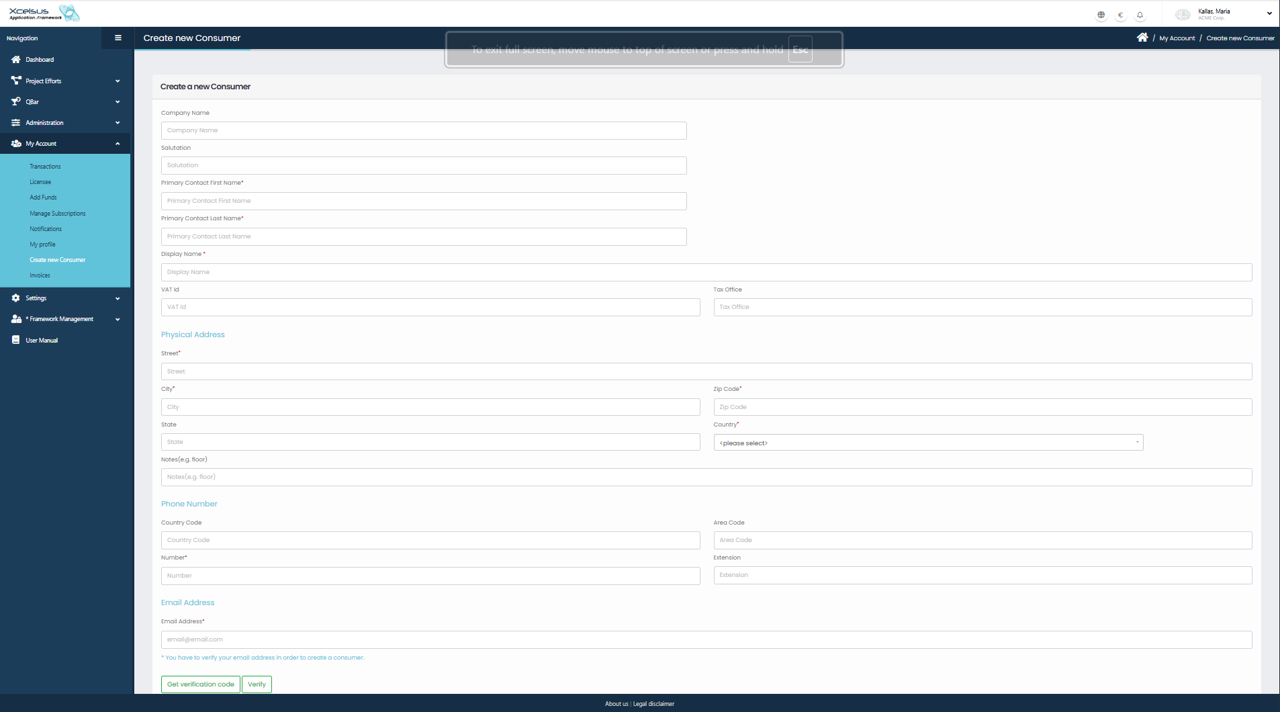
To create a new consumer, navigate to My Account in the left-hand menu and select Create new Consumer. This opens the Create new Consumer form, where you can enter all required company and contact information for the consumer account.

At the top of the form, enter the Company Name and, if applicable, a Salutation, followed by the Primary Contact’s First Name and Last Name. The Display Name field is required and represents how the consumer will be identified throughout the system, so it should be clear and easily recognizable.

You may also provide tax-related details by entering the VAT ID and Tax Office information. These fields are used for billing and invoicing purposes when applicable.

In the Physical Address section, enter the consumer’s street address, city, state, ZIP code, and country. An optional notes field is available for additional address details such as floor or unit number.

The Phone Number section allows you to enter the country code, area code, phone number, and extension, ensuring accurate contact information is stored for the consumer.

Finally, enter a valid Email Address. Email verification is required in order to create the consumer. Click Get verification code, then Verify once the code is received. After all required fields are completed and the email address is verified, the consumer can be successfully created and used for transactions within the system.

Was this helpful?

Yes  No

Didn't find your answer? Contact Us

Previously
My profile
Up Next
Invoices
Developed by
  • Xcelsus GmbH
  • Xcelsus Hellas M.I.K.E.
SUPPORT
  • Knowledge Base
  • Video Manuals
SOCIAL
  • Facebook
  • Instagram
  • LinkedIn
  • Privacy Policy
  • Terms and Conditions
  • Cookie Policy (EU)
  • © 2026 xcelsus group. All Rights Reserved.

Manage Consent
To provide the best experiences, we use technologies like cookies to store and/or access device information. Consenting to these technologies will allow us to process data such as browsing behavior or unique IDs on this site. Not consenting or withdrawing consent, may adversely affect certain features and functions.
Functional Always active
The technical storage or access is strictly necessary for the legitimate purpose of enabling the use of a specific service explicitly requested by the subscriber or user, or for the sole purpose of carrying out the transmission of a communication over an electronic communications network.
Preferences
The technical storage or access is necessary for the legitimate purpose of storing preferences that are not requested by the subscriber or user.
Statistics
The technical storage or access that is used exclusively for statistical purposes. The technical storage or access that is used exclusively for anonymous statistical purposes. Without a subpoena, voluntary compliance on the part of your Internet Service Provider, or additional records from a third party, information stored or retrieved for this purpose alone cannot usually be used to identify you.
Marketing
The technical storage or access is required to create user profiles to send advertising, or to track the user on a website or across several websites for similar marketing purposes.
  • Manage options
  • Manage services
  • Manage {vendor_count} vendors
  • Read more about these purposes
View preferences
  • {title}
  • {title}
  • {title}