Adding Funds
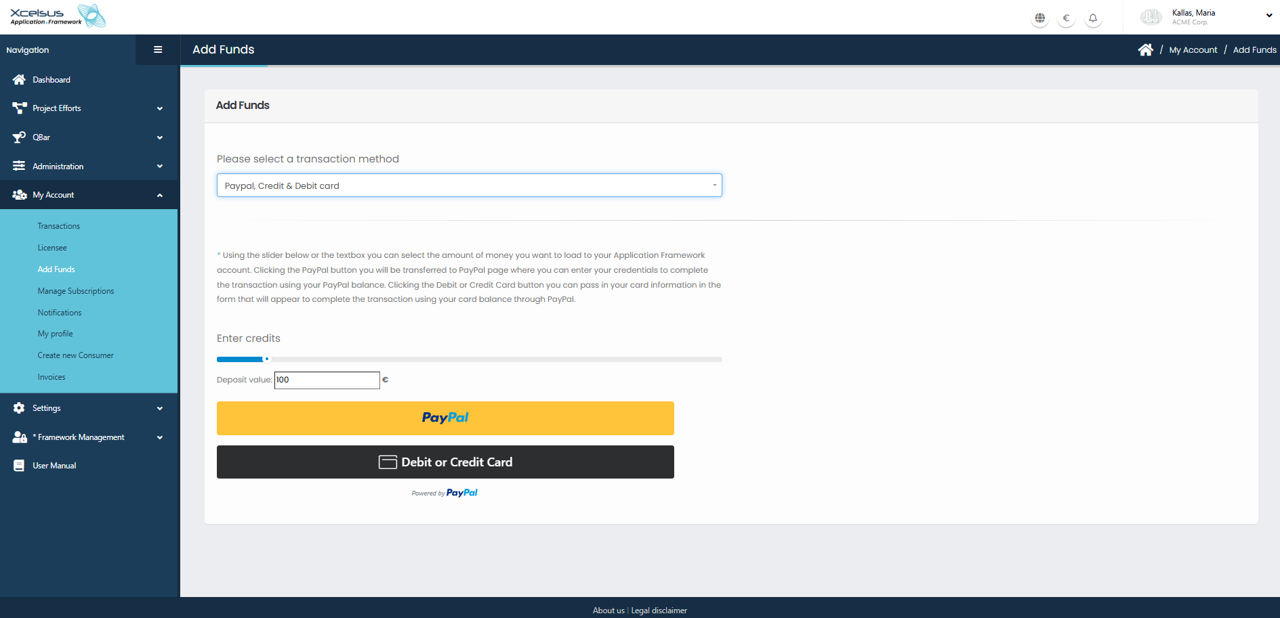
The Add Funds page allows users to load credits into their Application Framework account. To access this page, navigate to My Account from the main menu and select Add Funds. This section is used to deposit money that can later be applied to subscriptions, licenses, or other payable services within the platform.
At the top of the page, users must select a transaction method from the dropdown menu. Available options include PayPal as well as Credit or Debit Card payments processed through PayPal. Once a transaction method is selected, additional payment instructions are displayed on the screen.
Users can then choose the amount they wish to deposit by using the slider or by manually entering a value in the Deposit value field. The entered amount represents the number of credits that will be added to the account. As the value is adjusted, the selected amount is immediately reflected before proceeding with payment.
To complete the transaction, users can click the PayPal button to be redirected to PayPal’s secure payment page, where they can log in and confirm the payment using their PayPal balance. Alternatively, users may select Debit or Credit Card, which opens a PayPal-powered form allowing card details to be entered directly without requiring a PayPal account. Once the payment is successfully processed, the credits are added to the user’s account balance.
