

157 views 0 4. September 2024
To access the functionalities offered by our applications, every new user needs to sign up for Application Framework and create a new account. Users that are already registered can log in and accept new invitations from Consumers.
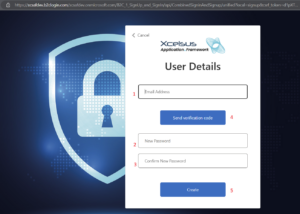
The first step requires to provide a valid e-mail address (1, that will be verified and used for identification and communication purposes, and to create and confirm a password for the user account (2, 3). In order to verify the e-mail address, click the button (4) and write in the code received in the e-mail once prompted to.
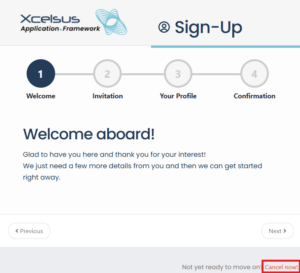
During the sign up process, you can always go back by clicking “Previous” or cancel the registration by clicking “Cancel now”.
Keep in mind that cancelling the registration once you have verified your e-mail address and provided a password, will require you to log in with those credentials in order to sign up, unless you want to use a completely new e-mail address.
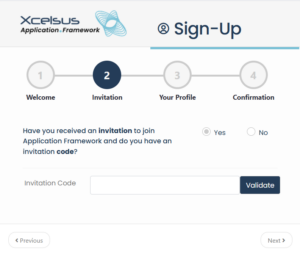
If you received an invitation in your e-mail inbox before your registration, you can click “Yes”, insert the invitation token in text box and click “Validate”.
This will link your user account to the Consumer that invited you, but you will be able to accept other invitations as well once registered.
You can also proceed without an invitation by choosing “No”. It will still be possible to enter your invitation token at a later stage or to create your own Consumer and invite others to join you.
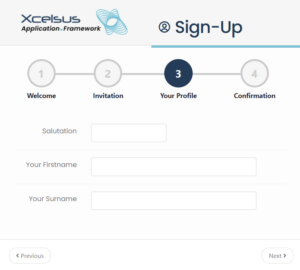
At this point in the registration process, you are required to provide your name, surname and a salutation. Please note that these will be visible to the Consumer(s) you belong to and will be used in all communications addressed to you.
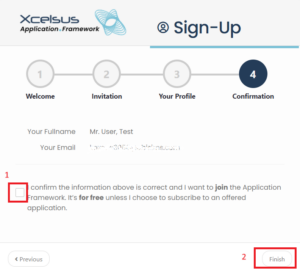
Once you confirm your subscription by checking the confirmation box (1) and click the “Finish” button (2), you will be redirected to Application Framework where you can start exploring our applications.
Didn't find your answer? Contact Us