The Logo of XcelsusThe Logo of Xcelsus
Open Application Framework
  • Home
  • DOCUMENTATION
    • Application Framework
    • Project Efforts
    • QBar
  • FAQ
  • Home
  • DOCUMENTATION
    • Application Framework
    • Project Efforts
    • QBar
  • FAQ

Application Framework

Home/Documentation/Application Framework
Expand All Collapse All
  • Registration process
  • Dashboard and toolbar explanation
  • Application Framework
    • Administration
      • Contacts
      • Companies
      • Customers
      • Employees
      • Users
      • Authorization
        • User Groups
        • User Permissions
        • Permissions Overview
      • Vat Rates
      • User Invitations
      • Translation
    • My Account
      • Transactions
      • Licensee
      • Add Funds
      • Manage Subscriptions
      • Notifications
      • My profile
      • Create new Consumer
      • Invoices
    • Settings
      • General Settings
      • User Settings
      • Project Efforts Settings

My profile

26 views 0 23. June 2024

My Profile

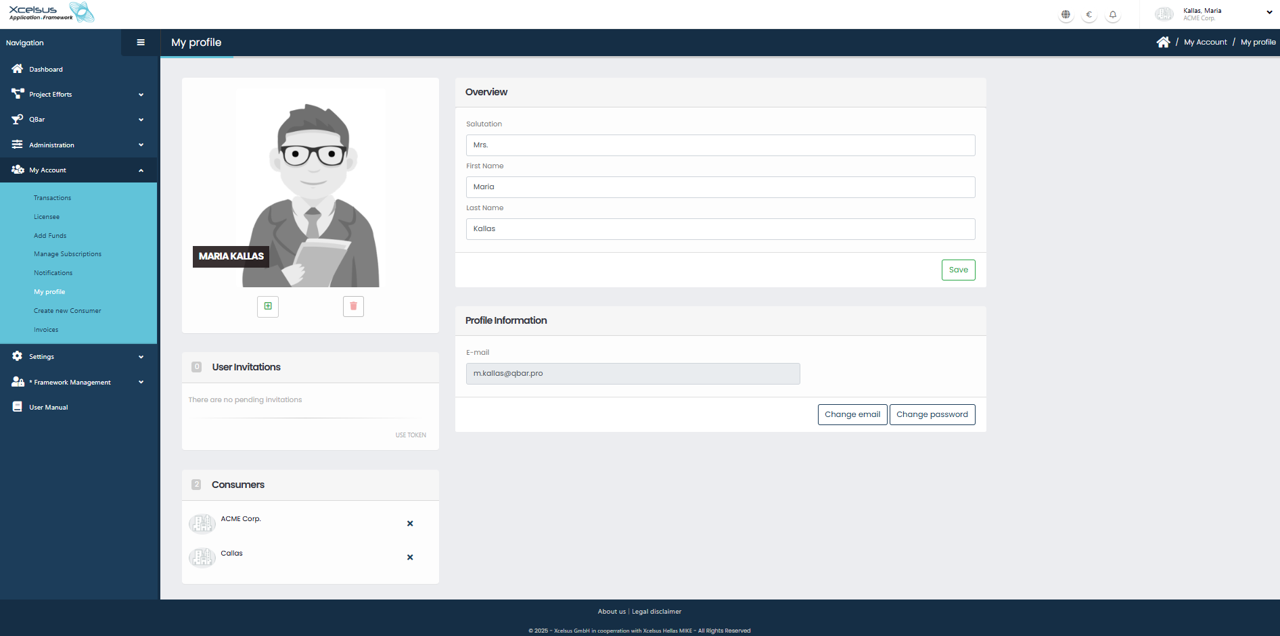
The My Profile page allows users to view and update their personal account information. This page is available under the My Account section in the navigation menu and provides an overview of both personal details and account settings.

At the top of the page, the Overview section displays the user’s salutation, first name, and last name. These fields can be edited directly. After making any changes, click the Save button to update the information. A profile avatar is displayed on the left side of the page, providing a visual identifier for the user.

Below the overview, the Profile Information section displays the user’s registered email address. The email field itself is read-only, but users can update their credentials using the Change email or Change password buttons. These options allow users to maintain secure and up-to-date login information.

The User Invitations section shows any pending invitations associated with the account. If no invitations are pending, this will be clearly indicated. Additionally, the Consumers section lists the organizations or consumers the user is currently associated with. Each consumer entry includes an option to remove the association if applicable.

All changes made on this page take effect immediately after saving, ensuring that the user’s account information remains accurate and current.

Change password and Change email verification:

Since password change and email change are sensitive actions, we need to verify that it’s really you

1. Click on the “Send verification code to current email” button

2. You will receive an email that includes the necessary token that we need so we can verify your identity. Please input the token in the field “Verification Code” and click Verify. 

if the token is correct:

  • you’ll move on to the next view where you can update your password / email

if the token is incorrect:

  • please make sure then token is correct or try again.


 After you have been successfully verified: 

Password change:

There are two fields: “New password” and “Repeat password” that you need to fill out with matching passwords. You can also hit the “Randomize” button to randomize your password. After you are done click the “Save” button to save your changes.


Email change:

There are two fields: “New email address” and “Verification Code”. Very similarly to the steps you followed before, now we need to verify that your new email address is valid and you have access to it. 

1. Fill in the “New email address” field and click the “Get verification code” button.

2. We have sent a verification code to your new email address, please use the code to fill in the “Verification Code” field.

3. Click “Verify”. 

If your token is correct then you can click save and your email address will be updated.

If not, then please try again.

Was this helpful?

Yes  No

Didn't find your answer? Contact Us

Previously
Notifications
Up Next
Create new Consumer
Developed by
  • Xcelsus GmbH
  • Xcelsus Hellas M.I.K.E.
SUPPORT
  • Knowledge Base
  • Video Manuals
SOCIAL
  • Facebook
  • Instagram
  • LinkedIn
  • Privacy Policy
  • Terms and Conditions
  • Cookie Policy (EU)
  • © 2026 xcelsus group. All Rights Reserved.

Manage Consent
To provide the best experiences, we use technologies like cookies to store and/or access device information. Consenting to these technologies will allow us to process data such as browsing behavior or unique IDs on this site. Not consenting or withdrawing consent, may adversely affect certain features and functions.
Functional Always active
The technical storage or access is strictly necessary for the legitimate purpose of enabling the use of a specific service explicitly requested by the subscriber or user, or for the sole purpose of carrying out the transmission of a communication over an electronic communications network.
Preferences
The technical storage or access is necessary for the legitimate purpose of storing preferences that are not requested by the subscriber or user.
Statistics
The technical storage or access that is used exclusively for statistical purposes. The technical storage or access that is used exclusively for anonymous statistical purposes. Without a subpoena, voluntary compliance on the part of your Internet Service Provider, or additional records from a third party, information stored or retrieved for this purpose alone cannot usually be used to identify you.
Marketing
The technical storage or access is required to create user profiles to send advertising, or to track the user on a website or across several websites for similar marketing purposes.
  • Manage options
  • Manage services
  • Manage {vendor_count} vendors
  • Read more about these purposes
View preferences
  • {title}
  • {title}
  • {title}