The Logo of XcelsusThe Logo of Xcelsus
Open Application Framework
  • Home
  • DOCUMENTATION
    • Application Framework
    • Project Efforts
    • QBar
  • FAQ
  • Home
  • DOCUMENTATION
    • Application Framework
    • Project Efforts
    • QBar
  • FAQ

Application Framework

Home/Documentation/Application Framework
Expand All Collapse All
  • Registration process
  • Dashboard and toolbar explanation
  • Application Framework
    • Administration
      • Contacts
      • Companies
      • Customers
      • Employees
      • Users
      • Authorization
        • User Groups
        • User Permissions
        • Permissions Overview
      • Vat Rates
      • User Invitations
      • Translation
    • My Account
      • Transactions
      • Licensee
      • Add Funds
      • Manage Subscriptions
      • Notifications
      • My profile
      • Create new Consumer
      • Invoices
    • Settings
      • General Settings
      • User Settings
      • Project Efforts Settings

Translation

24 views 0 23. June 2024

On this page you are given the ability to modify your translations for every entity, regarding your QBar page (regarding menu):
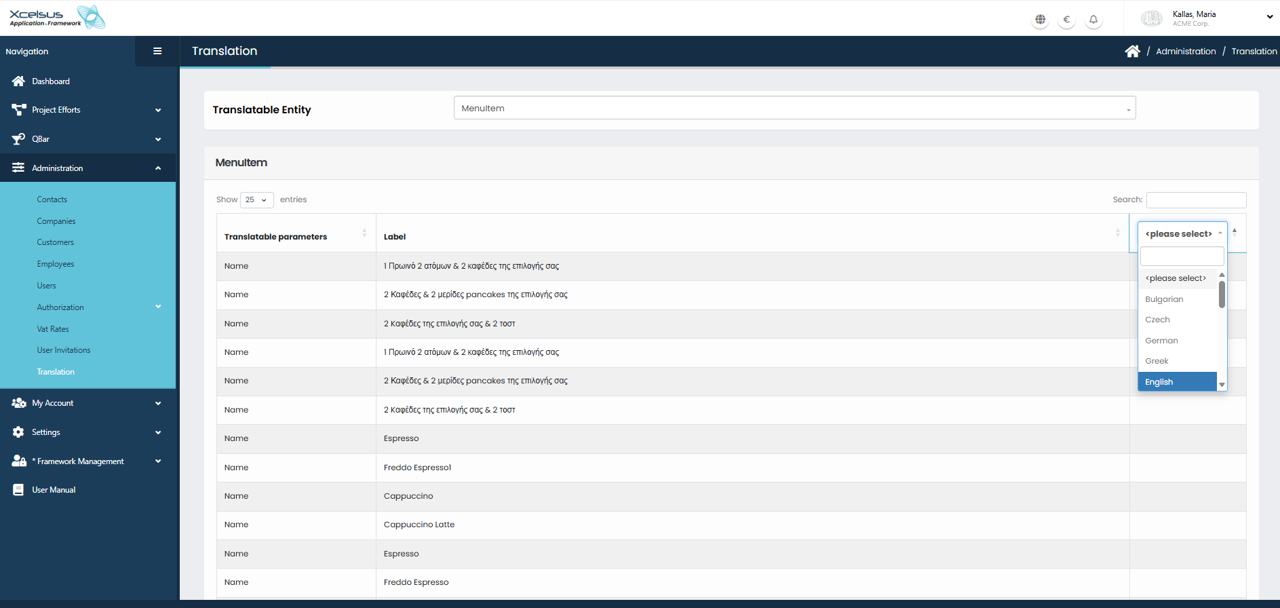
On this page, you can manage and customize translations for all entities related to your QBar menu. This functionality allows you to define how menu content is displayed across different languages, ensuring a consistent and localized experience for users.

Start by selecting a translatable entity group, such as Menu Item, Menu Category, Menu Item Option Group, Menu Option, or Allergen. Once an entity group is selected, a detailed table is displayed. This table lists all available translatable parameters for the chosen entity, such as names, titles, or descriptions (for example, an allergen name like “Peanuts”).

Next, choose the languages you want to work with by selecting them from the language dropdown. After selecting the languages, enter the appropriate translations into the fields provided for each parameter. Each row corresponds to a specific item, making it easy to review and edit translations in bulk.

After completing your translations, be sure to save your changes. Click the Save changes button at the bottom of the page to apply and store all updates. Any unsaved changes will be lost if you leave the page without saving.

This page provides a centralized and efficient way to manage multilingual content for your QBar menu, helping you maintain accuracy and consistency across all supported languages.

Was this helpful?

Yes  No

Didn't find your answer? Contact Us

Previously
User Invitations
Up Next
My Account
Developed by
  • Xcelsus GmbH
  • Xcelsus Hellas M.I.K.E.
SUPPORT
  • Knowledge Base
  • Video Manuals
SOCIAL
  • Facebook
  • Instagram
  • LinkedIn
  • Privacy Policy
  • Terms and Conditions
  • Cookie Policy (EU)
  • © 2026 xcelsus group. All Rights Reserved.

Manage Consent
To provide the best experiences, we use technologies like cookies to store and/or access device information. Consenting to these technologies will allow us to process data such as browsing behavior or unique IDs on this site. Not consenting or withdrawing consent, may adversely affect certain features and functions.
Functional Always active
The technical storage or access is strictly necessary for the legitimate purpose of enabling the use of a specific service explicitly requested by the subscriber or user, or for the sole purpose of carrying out the transmission of a communication over an electronic communications network.
Preferences
The technical storage or access is necessary for the legitimate purpose of storing preferences that are not requested by the subscriber or user.
Statistics
The technical storage or access that is used exclusively for statistical purposes. The technical storage or access that is used exclusively for anonymous statistical purposes. Without a subpoena, voluntary compliance on the part of your Internet Service Provider, or additional records from a third party, information stored or retrieved for this purpose alone cannot usually be used to identify you.
Marketing
The technical storage or access is required to create user profiles to send advertising, or to track the user on a website or across several websites for similar marketing purposes.
  • Manage options
  • Manage services
  • Manage {vendor_count} vendors
  • Read more about these purposes
View preferences
  • {title}
  • {title}
  • {title}